
Bharat Club login process: correct order kya hai?
Existing account open karte waqt sabse pehle destination verify karein. Uske baad registered mobile number, password aur verification prompt check karein. Agar aap old saved address use kar rahe hain aur wo blank screen, unrelated domain ya dead response deta hai, credentials enter karne se pehle current route confirm karna better hai.
Mobile number wahi use hona chahiye jo account creation ke time linked tha. Ek new number se old account normally open nahi hota. Password type karte waqt accidental spaces, number order aur keyboard auto-fill ko check karein. Agar password genuinely yaad nahi hai, repeated random attempts ke bajay recovery option use karein.
Bharat Club login interface
The supplied Bharat Club login interface matches this section directly: phone/email access, password entry, forgot-password access and customer-service access are visible in the actual game interface.
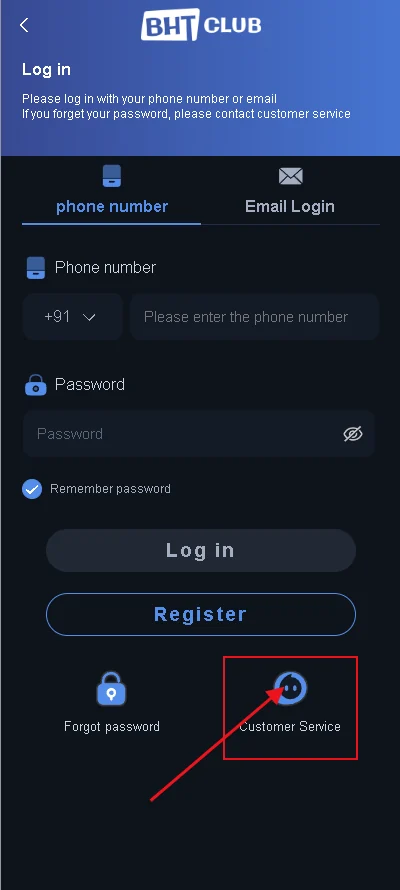
This is a historical game-interface reference. The live layout, wording, channels, timings and available controls can change between versions.
OTP nahi aa raha: repeated request se pehle ye checks karein
OTP delay ka reason account issue, network delay, incorrect mobile number ya too many repeated requests ho sakta hai. Pehle entered number ko verify karein. Mobile signal weak ho to thoda wait karein. Multiple OTP requests karne ke baad sirf latest valid code use karein; older code expire ho sakta hai.
Kisi chat contact, “support agent” ya prediction seller ko OTP forward na karein. One-time verification code account access ka sensitive part hai. Agar live interface OTP repeatedly fail dikha raha hai, exact wording save karein rather than sharing the code itself.
Wrong password aur recovery ko kaise separate karein
“Wrong password” message ka direct response reinstall nahi, recovery hai. Recovery flow me registered number or other verification required ho sakti hai. New password banate waqt email, banking, social account ya kisi dusre gaming account ka existing password reuse na karein.
Strong practical password ka goal complicated symbols show karna nahi, uniqueness maintain karna hai. Password manager use karte hain to account label clear rakhein so wrong credential auto-fill na ho. Recovery complete hone ke baad ek clean sign-in test karein.
Old access route aur redirect issue
Gaming platforms ke access addresses time ke saath change ho sakte hain. Old bookmark, forwarded short link ya copied message current destination se differ kar sakta hai. Agar address expected Bharat Club environment ke bajay kisi unrelated service par le jaye, credentials enter na karein.
Redirect chain ko “same platform” assume karna safe nahi. Current verified destination ka use karein, and agar aapke paas old account hai to UID or linked mobile number ready rakhein before contacting in-account help.
App me login fail but web access works
Agar account live interface me open ho raha hai but installed Android app me same credentials fail ho rahe hain, account itself necessarily broken nahi hai. Old build, cached state, network routing or app compatibility issue possible hai. Current app source section check karein before resetting account credentials.
Uninstall se pehle registered number aur password confirm karein. Sirf app icon par dependent rehna risky hai because reinstall ke baad credentials required honge.
Account restricted or unusual message
Restriction message ko exact wording ke saath save karein. “Account locked”, “verification required”, “abnormal activity” ya payment-related hold same problem nahi hote. Support ko useful evidence dene ke liye UID, time, exact message aur relevant order number enough ho sakte hain.
Password, OTP, bank PIN ya full card data support evidence ka part nahi hona chahiye. Agar koi individual remote-control access maange, stop karein aur access revoke karein.
Login safety checklist
Destination
Credentials enter karne se pehle address confirm.
Mobile number
Existing account ka linked number use karein.
Password
Unique credential; repeated guessing avoid.
OTP
Private rakhein; latest valid code use karein.
Error text
Exact message note karein before changing settings.
Remote access
Unknown contacts ko control permission na dein.
Device change, SIM change aur saved-session risk
New phone ya reset ke baad old saved session disappear ho sakti hai. Isliye account access ko sirf app ke remembered login par dependent na rakhein. Registered mobile number, password and UID ka private record maintain karein. SIM replace hui ho to same number active hai ya nahi first verify karein.
Device change ke baad extra verification normal ho sakti hai. Agar koi unknown contact device approve karne ke naam par remote control ya OTP maange, access deny karein. Verification user ke own device par live interface me complete honi chahiye.
Password manager, autofill aur wrong-account confusion
Multiple gaming accounts or similar names use karne par autofill wrong credential insert kar sakta hai. Password manager entry ko clear label dein and login submit se pehle linked mobile number compare karein. Auto-filled password ko blindly correct assume na karein.
If recovery ke baad new password set hua hai, old saved credential remove or update karein. Otherwise next attempt old password reinsert karke same error create karega.
Login issue ka support-ready evidence set
Useful login evidence simple hai: UID if available, linked mobile number ka masked version, exact error text, date/time, device type and whether only app affected hai or live interface too. OTP, full password and bank details include na karein.
Exact error wording save karne se not working jaise broad description se better context milta hai. Agar error only ek device par hai, comparison bhi useful signal hai.
Kab password reset relevant nahi hota
Blank app screen, dead destination, network timeout or transaction pending ko password problem assume karke reset mat karein. Reset tab relevant hai jab credential error, forgot-password need or explicit recovery prompt ho. Unnecessary resets confusion and saved-password mismatch create kar sakte hain.
Problem classify first, action second — ye login troubleshooting ka strongest rule hai.
Network, device time and session expiry checks
OTP verification and secure sessions device time or network interruption se affected feel ho sakte hain. Phone date/time automatic mode me hai ya nahi check karein, network stable hai ya nahi compare karein, and old session repeatedly reuse karne ke bajay clean login attempt karein.
Agar session expired message aaye, isse account lost assume na karein. Fresh sign-in normal next step hai. Network switch karte waqt unknown public Wi-Fi par sensitive login avoid karna better hai.
Password recovery ke baad final verification
Recovery complete hote hi new password ko ek baar manually use karke login test karein. Old password manager entry update karein, saved login credential or app autofill me stale value remove karein, and any unknown session warning ho to review karein.
Recovery ke turant baad transaction action karne se pehle account profile and UID confirm karna useful hai so wrong account or duplicate identity confusion na ho.
Bharat Club Game Login on mobile and app
Bharat Club Game Login usually refers to the same existing-account intent as Bharat Club Login. Mobile users may reach login through the web route or the Bharat Club App, but the core checks remain the same: registered mobile number, password, current access route and any verification prompt shown by the platform.
If Bharat Club Game Login works on the web route but fails inside the app, treat it as an app-version or local-device issue before resetting the account password. If both routes fail with the same credential error, use the password or verification flow instead of repeatedly reinstalling the app.
Bharat Club Login
Best for password, OTP, route and account-access troubleshooting.
Bharat Club Game Login
Same account-access intent, often searched by users trying to open the gaming interface directly.
Bharat Club Login ka complete access sequence
Existing account ke liye sabse pehle registered mobile number aur current login route verify karein. Password reset tabhi useful hai jab number correct ho aur account genuinely isi identity se linked ho. Old saved route ya unrelated destination open ho to credentials enter karne se pehle stop karein.
Login error ko exact wording ke saath note karein. Wrong password, OTP delay, account restricted, app not loading aur route unavailable alag issues hain. Sabko ek generic “login not working” problem samajhne se diagnosis weak ho jata hai.
Mobile number and password mismatch
Number me single digit error existing account ko open nahi karega. Password type karte waqt spacing, letter order and number order check karein. Repeated random attempts additional verification trigger kar sakte hain, isliye recovery route ko time par use karna better hai.
New password create karte waqt email, banking ya other important account ka reused password avoid karein. Bharat Club Login ke liye separate unique password rakhna account safety improve karta hai.
OTP and verification problems
OTP late aaye to latest valid code hi use karein. Multiple codes request karne par older code expire ho sakta hai. Mobile signal, SMS filtering and exact registered number verify karein.
OTP kisi support contact, agent ya third party ko forward na karein. Verification code account owner ke own login process ke liye hota hai.
App login vs web login
If Bharat Club Login web route par work karta hai but app me fail hota hai, issue app version, local cache or device compatibility ka ho sakta hai. Password repeatedly reset karna necessary nahi. Bharat Club App section source and update checks separately cover karta hai.
If both web and app same credential error show karein, account-level password or verification flow ko priority dein.
Account restriction and support escalation
Restriction message aaye to exact text save karein, UID if visible note karein, and support interaction ke liye non-sensitive evidence ready rakhein. Full password, OTP, bank PIN or card PIN share na karein.
Detailed support routing ke liye Customer Service section use karein.
BHT Club Login and Bharat Club Login
BHT Club wording historical interface branding me visible rahi hai, while users Bharat Club Login phrase se account access dhoondhte rahe. Account credentials tabhi enter karein jab destination intentionally verify kiya gaya ho.
If app and web route different behavior show karein, password reset se pehle issue ko app-level vs account-level problem me separate karein.
Common questions
Bharat Club login ke liye different mobile number use kar sakte hain?
Existing account ke liye linked mobile number use karein. Different number old account ko open nahi karega.
Password yaad na ho to kya karein?
Live recovery flow use karein aur unique new password set karein.
OTP delay ho to kitni baar request karein?
Number and signal verify karke wait karein; repeated requests avoid karein and latest valid code use karein.
Old saved link open ho raha hai, use karna safe hai?
Address verify kiye bina credentials enter na karein.
Support ko OTP dena chahiye?
Nahi. OTP private verification code hai.
App me login fail but site open ho to kya issue hai?
Installed build or app compatibility issue possible hai; account necessarily broken nahi.
Restriction message aaye to kya save karein?
UID, exact message, time and relevant non-sensitive evidence save karein.