
Exact error ko category me convert karein
“Account nahi chal raha” se troubleshooting start karna difficult hota hai. Exact message note karein: wrong password, OTP failed, account restricted, network error, deposit pending, withdrawal rejected or app update required. Har category ka next step different hota hai.
Random settings change karne se pehle error text and time save karein. Isse later compare kar sakte hain ki problem change hui ya same hai.
Settings and password-change interfaces
Both screenshots are actual Bharat Club account interfaces. The Settings Center exposes login-password controls, and the second screen shows the password-change form.
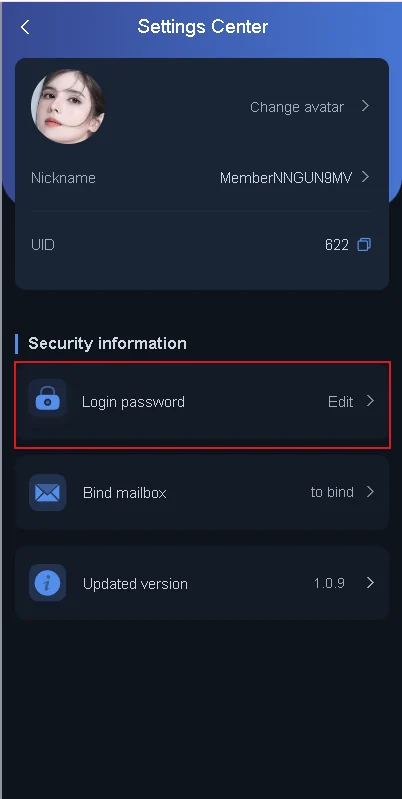
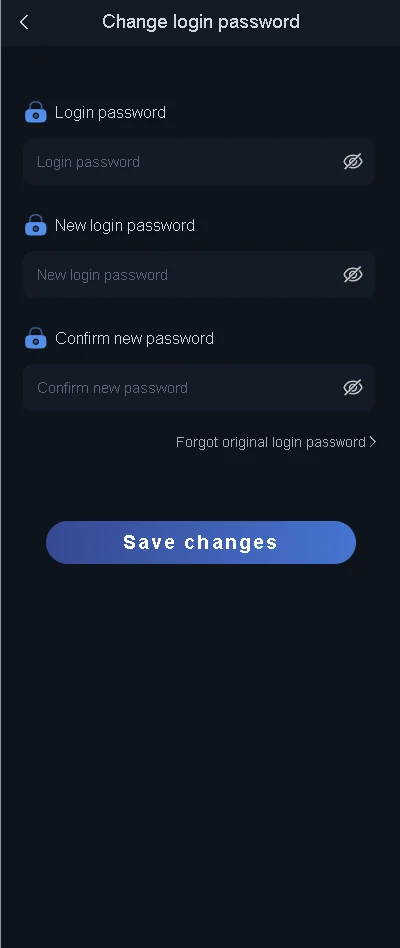
This is a historical game-interface reference. The live layout, wording, channels, timings and available controls can change between versions.
Access issue vs transaction issue
Agar account login ho raha hai but deposit or withdrawal wrong hai, credentials reset karna usually relevant nahi. Ye transaction issue hai. Agar login itself fail hai but no payment issue, UTR evidence irrelevant hai. Two problems ko separate rakhne se unnecessary actions reduce hote hain.
Account restriction message
Restriction ke exact words important hain. Verification required, abnormal activity, security lock or transaction hold different states ho sakte hain. UID, time, device context and exact message save karein. If a related order exists, order number bhi note karein.
Restriction solve karne ke naam par unknown contact ko screen share, OTP or remote control na dein. Sensitive credentials issue evidence nahi hain.
Phone number lost or SIM unavailable
Agar linked number ka access lost hai, recovery harder ho sakti hai. New account create karne se pehle current account recovery options inspect karein. Agar mobile operator ke through same number recover ho sakta hai, that may preserve verification continuity.
Do not publish full mobile number or UID publicly while asking for help. Private in-account support route prefer karein.
App and network issues
App crash, blank screen or network error ko account suspension assume na karein. Current live route test karein, network change karke compare karein and app version check karein. If only app fails, account may still be healthy.
Cache clear or reinstall se pehle credentials confirm karein. Uninstall ke baad saved session unavailable ho sakti hai.
Transaction-related account hold
Deposit mismatch or withdrawal verification account-level prompt create kar sakta hai. Relevant order number, amount and transaction reference ready rakhein. Full bank statement bhejne se pehle sensitive unrelated entries crop karein if a screenshot is genuinely required.
Support-ready evidence checklist
UID
Account identifier if available.
Error text
Exact wording, not paraphrase.
Timestamp
Issue kab hua.
Order number
Transaction issue me relevant.
UTR
Only payment issue me.
Safe screenshot
OTP, PIN and unrelated bank data hidden.
Red flags: kab immediately stop karein
Unknown remote-control request, bank OTP demand, “unlock fee”, suspicious APK, unrelated destination, or pressure to share password — in situations me further action stop karein. Account recovery ko secure channel ke through continue karein.
New device login and security verification
New device or network se sign-in extra verification trigger kar sakta hai. This does not automatically mean account blocked. Verification prompt live interface me complete karein and OTP private rakhein.
If new device login ke baad old device unusual notification show kare, sessions review option available ho to inspect karein. Unknown device access suspect ho to password change relevant ho sakta hai.
Account compromise suspicion me first actions
Unexpected password change, unknown session, unrecognized transaction or changed bank detail dikhai de to normal troubleshooting se priority shift security containment par jati hai. Password reset through live recovery, session review if available and in-account support contact important steps hain.
OTP or recovery code kisi person ko forward na karein. Remote-control app installed ho to access revoke and device permissions review karein.
Support conversation ko structured rakhein
One message me UID, exact issue, time, relevant order number and what you already checked include karna useful hai. Multiple contradictory descriptions or many unrelated screenshots support context ko confuse kar sakte hain.
Sensitive information intentionally exclude karein. I can log in, but withdrawal order is pending is more useful than everything not working.
When account issue is actually device issue
Agar same credentials another device or live interface me work karte hain, problem account-level nahi ho sakti. Device storage, app version, network, cached state or Android permission inspect karein before account recovery changes.
Conversely, same error har device par aaye to account or service-side issue more likely hai.
Issue timeline banane se mixed problems clear hote hain
Account issue ek se zyada events ka combination ho sakta hai. Simple timeline likhein: last successful login kab hua, app update kab hua, first error kab aaya, any password change, any deposit or withdrawal around same time. This sequence cause isolate karne me help karta hai.
Timeline me sensitive credentials include na karein. Date, time, error and action enough hote hain.
Lost device or stolen phone ke case me priority
Phone lost ho jaye to account troubleshooting se pehle mobile number and device security important ho jati hai. SIM block or recover, device account protections use karein, and Bharat Club password reset relevant ho sakta hai if saved session accessible thi.
Unknown person ke paas device access ka possibility ho to transaction and account profile changes monitor karein and in-account support ko structured evidence ke saath contact karein.
One change at a time troubleshooting
Same time password reset, app reinstall, network change and phone reset karne se kaunsi action actually problem solve karti hai identify karna impossible ho jata hai. Ek change karein, result observe karein, then next step decide karein.
This approach especially useful hai jab issue intermittent ho. Exact before/after state note karne se repeat problem ka pattern clearer hota hai.
One problem at a time: access, app or payment
Multiple symptoms ek saath dikh sakte hain, but troubleshooting order matter karta hai. First confirm whether the account can be accessed. If login works, check whether the app itself is current. If both are fine, transaction issue ko separately investigate karein. This sequence prevents a payment problem from being misdiagnosed as a password problem.
For login-specific checks use Bharat Club Login; installation-specific checks ke liye Bharat Club App Download; and UTR or withdrawal issue ke liye transaction section. Support escalation ke liye Customer Care section evidence checklist provide karta hai.
Issue ko correct category me identify karein
Login issue, app issue, deposit issue and withdrawal issue ko same problem samajhne se troubleshooting weak ho sakti hai. First exact symptom identify karein, phir matching section use karein.
Login problem
Use Bharat Club Login.
App problem
Use Bharat Club App.
Deposit problem
Use Bharat Club Deposit.
Withdrawal problem
Exact error message save karein
Wrong password, OTP failed, account restricted, network issue, deposit pending and withdrawal rejected sab alag meanings rakhte hain. Exact wording note karna support interaction ko stronger banata hai.
Random app reinstall, password reset and payment retry ek saath karne se original issue trace karna difficult ho sakta hai.
Account safety while troubleshooting
OTP, full password, bank PIN, card PIN and remote-control access unknown contact ko share na karein. UID, order ID, UTR and exact error wording more useful non-secret evidence hai.
When to move from self-checks to support
Basic checks complete hone ke baad issue unresolved ho to Customer Service section me support-ready checklist use karein. Same evidence repeatedly change na karein; clear chronology maintain karein.
Common questions
Support se contact karne se pehle kya save karein?
UID, exact error, time and relevant order information.
Account restriction ka exact reason kaise pata chalega?
Live message and account status use karein; generic guess par depend na karein.
Reinstall sab problems fix karta hai?
Nahi. Transaction and restriction issues app reinstall se solve nahi hote.
Phone number access lost ho to?
Recovery options inspect karein and same number restore possibility check karein.
Support ko full password dena chahiye?
Nahi.
Screenshot me bank data share karna safe hai?
Only necessary non-sensitive evidence; OTP, PIN and unrelated entries hide karein.
App blank hai to account blocked hai?
Zaroori nahi.