
Bharat Club Withdrawal 2026 – Pending, Rejected & Bank Credit Help
Bharat Club Withdrawal ka primary URL ab ye historical path hai. Pending order, rejection, completed status, missing bank credit aur account-method checks ko yahan separate flow me handle kiya gaya hai.
Before requesting a withdrawal
Withdrawal start karne se pehle account method, bank or payment details and requested amount ko check karein. Typing error ya stale payment details avoidable rejection create kar sakte hain.
Request submit hone par order number, requested amount and exact time note karein. Ye three details later support interaction ko much clearer banate hain.
Pending withdrawal status
Pending status ka fixed completion time assume na karein unless current live interface explicitly time window show kare. Repeated cancel/retry or multiple parallel requests evidence ko confusing bana sakte hain.
Order status same ho but unusually long wait ho, to account UID, order ID, amount and status screenshot ready rakhein.
Completed but bank credit missing
Platform order completed dikh raha ho but bank credit visible na ho to platform status aur bank transaction history dono preserve karein. Completed label aur actual bank credit ko same event assume na karein.
Full bank password, OTP or PIN share karne ki zarurat nahi honi chahiye. Relevant evidence order number, amount, time and bank-side credit status hai.
Rejected withdrawal
Rejected request ke exact message ko save karein. Account-method mismatch, verification requirement or other conditions different fixes need kar sakte hain. Randomly repeated withdrawal requests root cause clear nahi karte.
Withdrawal support path
If issue unresolved ho, Customer Service section me support-ready checklist use karein. Deposit problem ho to Bharat Club Deposit section separately follow karein.
Withdrawal interfaces
Actual historical interface screenshots Wallet → Withdraw entry aur withdrawal form ko directly match karte hain.
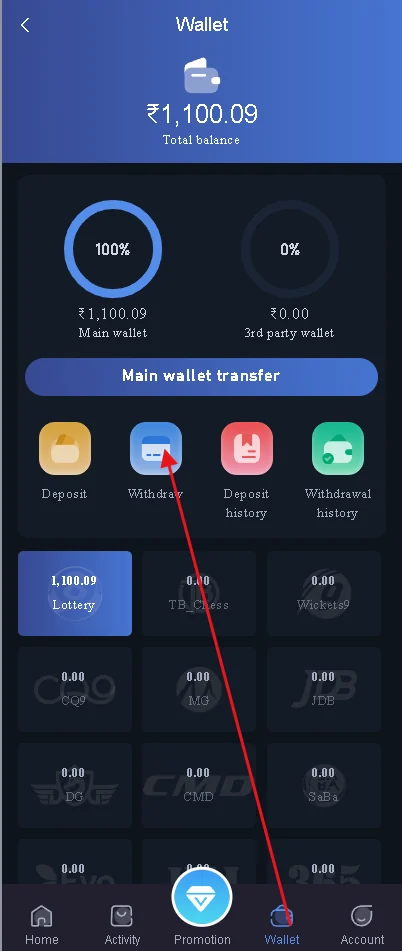
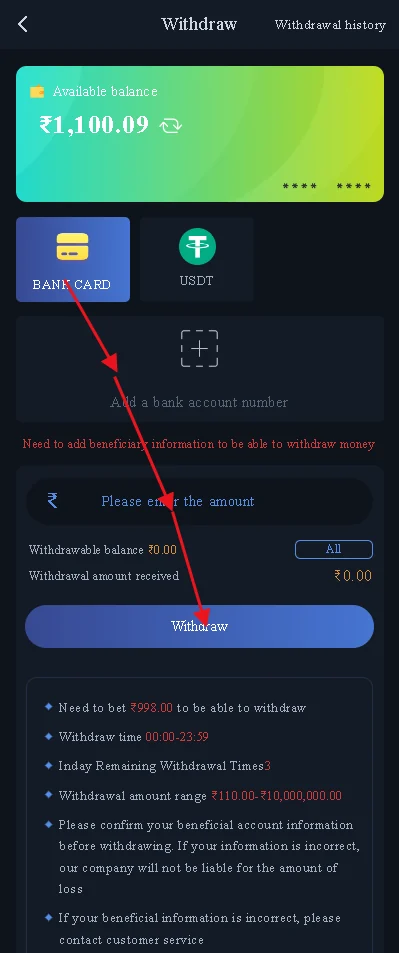
Historical interface reference only. The live layout, wording, timings, channels and available controls can change between versions.
Account-method verification before withdrawal
Bank, UPI or other withdrawal method add karte waqt name, account detail and method selection ko carefully check karein. Typing mistake request rejection, delay or manual verification trigger kar sakti hai. Existing saved method use kar rahe hain to bhi confirm karein ki detail still valid hai.
If method recently changed hai, first request se pehle account settings and visible confirmation status check karein. New method and old order history ko mix na karein.
Withdrawal order timeline
A clear timeline support ke liye strong evidence hota hai: request created, order ID generated, status changed, completed shown, bank credit received or not received. Har status ke exact time ko note karna useful hai.
Pending order ko repeatedly refresh karna status change nahi karta, but screenshot time record helpful ho sakta hai. If status later rejected or completed hota hai, before/after evidence maintain karein.
Completed status but no credit
Bharat Club Withdrawal completed label dikhne ke baad bank credit missing ho to account order reference and relevant bank statement period compare karein. Sometimes banking notification delay ho sakta hai, so actual transaction history check karna better hai than notification alone.
If support ko evidence bhejna ho, unrelated transactions blur/crop karein. Full bank credentials or OTP share karna necessary nahi hai.
Withdrawal after password or account changes
Recent password reset, account-detail change or verification update ke baad extra checks appear ho sakte hain. Exact message save karein and multiple conflicting changes ek saath avoid karein, because root cause identify karna difficult ho sakta hai.
Account access unstable ho to pehle Bharat Club Login issue resolve karein, phir withdrawal status handle karein.
Withdrawal amount and balance checks
Request submit karne se pehle available balance and requested amount ko compare karein. If interface minimum or maximum amount show karta hai, current visible condition ko follow karein. Old remembered limit ko current rule assume na karein.
If request button inactive ho, exact on-screen message note karein rather than repeatedly changing account details. Verification or balance condition separately resolve ho sakti hai.
After the bank credit arrives
Withdrawal bank me credit ho jane ke baad order record ko immediately delete karna necessary nahi. Short period ke liye order ID, amount and completion time retain karna useful ho sakta hai if later reconciliation issue appears.
Shared chat me sensitive bank screenshot permanently leave na karein. Issue resolve hone ke baad unnecessary copies remove kar sakte hain.
Withdrawal request create karne se pehle
Saved bank or payment method still correct hai ye verify karein. Name, account detail, payment method and requested amount ko final submit se pehle check karein. Typing error avoidable rejection create kar sakta hai.
Request submit hote hi order ID, amount and exact time note karein. Ye later bank-credit comparison ka base record hota hai.
Pending withdrawal ko kaise track karein
Pending order ke liye fixed completion time assume na karein unless current interface clearly specific time show kare. Multiple cancel/retry actions same issue ko more confusing bana sakte hain.
Status screenshot useful ho sakta hai, but password or banking secret information visible na rakhein.
Completed status but bank credit missing
Platform completed dikhata hai but bank transaction history me credit missing ho to order reference and relevant bank period compare karein. Notification delay aur actual bank transaction history different ho sakte hain.
Support ko order ID, amount, completion time and non-sensitive bank evidence provide karna more useful hai than full account screenshot.
Rejected withdrawal ka exact reason
Rejection message save karein. Account-method mismatch, verification requirement or other rule different fixes demand kar sakte hain. Repeated random requests root cause identify nahi karte.
Customer Service escalation ke liye support section use karein.
Frequently asked questions
Bharat Club Withdrawal pending ho to kya save karein?
Order ID, amount, request time and current status.
Completed dikh raha hai but bank me amount nahi aaya?
Platform completed status and relevant bank history dono preserve karein.
Rejected withdrawal ka kya karein?
Exact rejection message and account-method details check karein.
Withdrawal ke liye UTR hota hai?
The exact reference shown depends on the payment flow; use the order/reference information actually displayed.
Kya support ko bank OTP dena chahiye?
Nahi.